
Showing posts with label technology. Show all posts
 Everyone wants that the smart phone bought by spending lots of money may run speed but all smart phone are getting hang nowadays. It runs speed after switching off. The processor used in cheap mobile, capacity of storage, increasing size of apps and viruses are the main causes to be slow smart phones.
If you are using Android phones then comparatively you might have faced the more problems to be slow than other devices.There are some simple ways to make your smart phone faster.
(1) Restart your phone
If your are using your phone for a long time then the processor of your mobile gets tired so it also may be the cause of slow your mobile. So if your mobile got slow then first time switch it off and restart again.
(2) Make sure that your operating system is updated
Operating system is another main cause to be slow your mobile. If your are not using the latest operating system of your mobile then your mobile gets slow. If your are not using the latest version of your operating then update it. To check your version of your operating system go to setting>more>about device>software update> update (check for update). If available update it.
(3) Delete all unwanted apps,musics,videos, pictures
The videos, images,musics,apps you downloaded occupy lost of space in your memory. If memory of your mobile got full then it also may be the cause to be slow your phone so Check your memory and delete all unwanted,useless apps, pictures,songs and videos because phone runs more speed if there is lots of space in your memory.
(4) Clear the cached
When you open an app once some of fixed data saves in your phone that's why you don't have to download it every time you open it. To save the data of your mobile most of the apps automatically save fixed files in your memory, it is said cache. Your phone may gets slow because of this kind of cache so you have to clear it. To clear the cache of your phone go to the setting>more>storage>cached data, click on cached data and clear it.
(5) Watch dog task manager
Every apps you downloaded don't have the same capacity. Some of them uses much resources which causes to be slow to your phone . Download 'Watch Dog Task Manager" app from play store to know which app is using much capacity or space. This app shows details about the used capacity and space of all apps. So according to this details you may delete the apps which use much capacity.
 In the world risk of computer is increasing day by day. All computer will be worthless by the sixyears. Data storage company has warned there will be lack of the data space of the computer in the world within 2020 AD. According to Data storage company Seagate, 6 databytes has been less in the computer data storage capacity in the world.It is a double of the produced computer data storage in the 2013 AD. According to the deputy chair main of branded product of the company Mark whitby "there is so high demand of computer in the world but the companies are unable to supply it. Warning of the company is an appeal for the computer users not to buy new data storage and keep deleting the useless files from the hard drive of the computer as per Dailymail.
Take Radar said during the interview blaming to the hard drive producer for the crisis of the data storage "they are not paying attention to the in the production of more storage capacity in the less space". He also informed that SeaGate is developing the technology to increase the storage space started to test "Hit Accited Magnetic Recording" technology.
 Mobile apps developer company of Nepal "Shiran technology" has developed a new Nepali app named "Show time".It is specially designed for the movie lovers. It will show the all the running and upcoming films of the main cinema hall of Nepal.
There are all kinda facilities like show time, preview,review,trailer and rating. Online booking and calling to book tickets is the best facilities of this app according to the company. You can keep on the watch list the movie you liked and upcoming movies as well. "The app built first time in Nepal and will updates more facilities like writing review after watching the movie" said Sajat Shresth the chief of shirantech.
Recently the app "Show Time" is available only for Android platform but will be soon available in IOS as well. To download this app on your android phone You will have to go to the 'play store'.
Type "showtime" in the search box of Play store.After that there will appear more results but you have to select 6th results named "ShowTime shiran tech". Now install it and get all kinda information about the movie.
When you turn on the mobile data in your 3G or LTE enabled device, a letter usually appears at the top of your display screen. But what does this mean? And how is it going to help you?
At first, I was really confused what these letters mean. Sometimes, it would show 3G, while other times it would show H. All I knew was that it somehow told me the type of connection the network is using. And before I did some research, I honestly thought that 3G is faster than H.
But I was wrong.
To share what I’ve learned about the meaning of these letters and when to care about it, I’ve created a simple way to remember the letters:
What does G, E, 3G, H, H+, 4G
G stands for gprs and its the slowest standard network used is GSM network 2G.
E is an extension of GPRS,it i called EDEG and it is correspondingly little faster but still used the old GSM network 2G.
3G stands for UMTS and it is the successor to the GSM network and faster.
H and H+ are standing for HSPA and HSPA+.both used the UMTS network where H is faster than 3G and H+ is faster than H.
4G stands LTE and it is the best network.
4G LTE is one of several competing 4G standards along with Ultra Mobile Broadband (UMB) and WiMax (IEEE 802.16). The leading cellular providers have started to deploy 4G technologies, with Verizon and AT&T launching 4G LTE networks and Sprint utilizing its new 4G WiMax network.
FULL FORM
LTE :an abbreviation for Long-Term Evolution, commonly marketed as 4G LTE
GPRS-General Packet Radio Service
GSM-The Global System for Mobile Communications
CDMA-Code Division Multiple Access
HSPA- High Speed Packet Access.
UMTS®: Universal Mobile Telecommunications System.
4G: forth generation
4G or LTE connection is the latest and the fastest type of connection. You should be jumping up and down when you see this. According to SMART, LTE connection can reach up to 42 MBPS. But this wildly varies.
Now, when it displays the letter “H” or “H+”, it means that you’ll be getting decent and stable connection but not as fast as 4G.
When it shows 3G, it’s still acceptable but it will be slower compared to H and H+. Sometimes, it would show G or E, which indicates the slowest type of connection.
Knowing these letters and what they mean is crucial when you’re signing up for unlimited surfing promos. You don’t want to sign up for a five-day Unlisurf only to realize that the connection is too slow.
It’s best to do a speed test first and check the letter it displays before signing up for unlimited surfing promos.
Keep in mind though that the letters will vary a lot during different times of the day even in the same location. In my place, the letters can go from H to E. So, try out different spots in your home (like moving the device closer to windows).
Is your device LTE enabled? What’s the average speed your getting? I’m really interested to know how LTE performs in different locations! So, please do comment below!
If your carrier is using 3GPP (previously known as GSM) network technology, the high-speed data technology is called "HSPA" and there are different generations and variations of that technology. All of the "H" variants have a higher theoretical maximum data rate compared to any form of "3G".
If you have the earlier HSPA or HSDPA link active, you will see "H". If you have a higher-speed "HSPA+" link active, you will see the "H+" icon. In general, that means that your data transfer speed can be faster, depending on network conditions. More info on the different variants here:
Facebook Messenger for web version. have you tried it ?
Worlds number one social network Facebook has already published a different platform named Messenger app to chat on mobile version but now Facebook has published Messenger on web version as well with a different domain name.
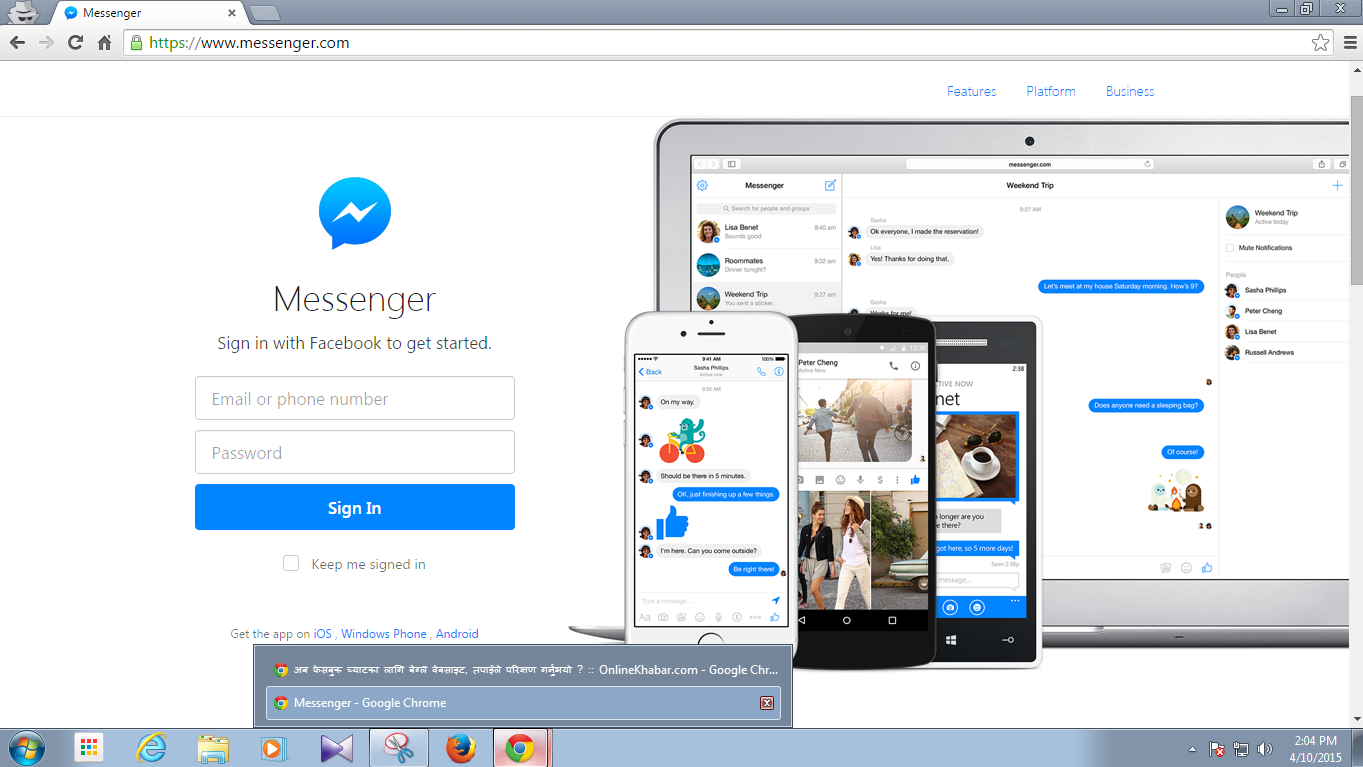
You can open it on the same browser in different window where you are using Facebook. If you are using desktop site then you may go here to try yourself >> https://www.messenger.com . Unless you are not logged in to your Facebook account then you have to log in with your email and password .If you have already opened your Facebook account then you don't need to log in again.
In this new platform you may see a big and clear window to chat. It looks just like as the mobile version but its really good for chat.
You can chat without opening your Facebook account in this platform but you are not oblige to use it. You can chat from the old Facebook chat as well. You can open new platform If only you prefer to chat from it.
Last year Facebook had published a new Messenger app for mobile version and then Facebook closed messenger option for mobile version . That is why users are oblige to download Messenger app on mobile version.
Facebook is trying to develop it as a hub of communication . Last week Facebook had announced about the facility of money transaction thru Messenger chat .
You can open it on the same browser in different window where you are using Facebook. If you are using desktop site then you may go here to try yourself >> https://www.messenger.com . Unless you are not logged in to your Facebook account then you have to log in with your email and password .If you have already opened your Facebook account then you don't need to log in again.
In this new platform you may see a big and clear window to chat. It looks just like as the mobile version but its really good for chat.
You can chat without opening your Facebook account in this platform but you are not oblige to use it. You can chat from the old Facebook chat as well. You can open new platform If only you prefer to chat from it.
Last year Facebook had published a new Messenger app for mobile version and then Facebook closed messenger option for mobile version . That is why users are oblige to download Messenger app on mobile version.
Facebook is trying to develop it as a hub of communication . Last week Facebook had announced about the facility of money transaction thru Messenger chat .
Is your smart phone slow? here are some steps for remedy.
Everyone wants that the smart phone bought by spending lots of money may run speed but all smart phone are getting hang nowadays. It runs speed after switching off. The processor used in cheap mobile, capacity of storage, increasing size of apps and viruses are the main causes to be slow smart phones.If you are using Android phones then comparatively you might have faced the more problems to be slow than other devices.There are some simple ways to make your smart phone faster.
(1) Restart your phone
If your are using your phone for a long time then the processor of your mobile gets tired so it also may be the cause of slow your mobile. So if your mobile got slow then first time switch it off and restart again.
(2) Make sure that your operating system is updated
Operating system is another main cause to be slow your mobile. If your are not using the latest operating system of your mobile then your mobile gets slow. If your are not using the latest version of your operating then update it. To check your version of your operating system go to setting>more>about device>software update> update (check for update). If available update it.
(3) Delete all unwanted apps,musics,videos, pictures
The videos, images,musics,apps you downloaded occupy lost of space in your memory. If memory of your mobile got full then it also may be the cause to be slow your phone so Check your memory and delete all unwanted,useless apps, pictures,songs and videos because phone runs more speed if there is lots of space in your memory.
(4) Clear the cached
When you open an app once some of fixed data saves in your phone that's why you don't have to download it every time you open it. To save the data of your mobile most of the apps automatically save fixed files in your memory, it is said cache. Your phone may gets slow because of this kind of cache so you have to clear it. To clear the cache of your phone go to the setting>more>storage>cached data, click on cached data and clear it.
(5) Watch dog task manager
Every apps you downloaded don't have the same capacity. Some of them uses much resources which causes to be slow to your phone . Download 'Watch Dog Task Manager" app from play store to know which app is using much capacity or space. This app shows details about the used capacity and space of all apps. So according to this details you may delete the apps which use much capacity.
How to use your mobile thru your PC
Development of technology is making the world easiest day by day. So today we are going to discuss about the system to operate your mobile thru your PC. Suppose you are using internet on your computer by putting your mobile phone far from you or charging somewhere. At that time some called you then how do you receive that call thru your computer?

You can do everything in your phone thru your computer. Do you think it is possible ? Of course it is possible but you have to install "Mighty Text" app on your Chrome browser and on you mobile. So lets discuss about it.
First of all your phone and pc must be connected with internet connection. Then you have to install a Mighty Text plugin on your Google chrome.To install the plugin on your browser please go thru this link http://mightytext.net/install . From this link you can install the app on both of your mobile and on your browser as well. After going thru above link from the first number you can install it on your mobile and from the second number you can install it on your Chrome browser.To install it on your pc please click on first number Install MightyText Chrome Extension of the second number after that a small pup up window will appear. And you have to click on Add. Now you have installed it on your browser. Now you can install Mighty Text direct thru this link https://play.google.com/store/apps/details?id=com.texty.sms&referrer=referral_code%3DREpLT6X on your mobile .
After installing the app on your Google Chrome browser an icon will appear at the top of the left hand side of your browser which you can see on the picture above. After that you have to click on that icon of Mighty Text (M). Then lunch it.After that you have to sign up using the Gmail account which you have used on your mobile. When you sign up for it then Google will share everything of your mobile with Mighty Text but not your password.
After doing this all now you can see your mobile on your browser. you get every notifications like charging,messaging. You can receive the call and make a call as well. You can view your pictures and video on your pc. Now you can do everything on your mobile thru your pc.
After installing the app on your Google Chrome browser an icon will appear at the top of the left hand side of your browser which you can see on the picture above. After that you have to click on that icon of Mighty Text (M). Then lunch it.After that you have to sign up using the Gmail account which you have used on your mobile. When you sign up for it then Google will share everything of your mobile with Mighty Text but not your password.
After doing this all now you can see your mobile on your browser. you get every notifications like charging,messaging. You can receive the call and make a call as well. You can view your pictures and video on your pc. Now you can do everything on your mobile thru your pc.
Top five most popular smart phone apps of 2014
The year 2014 has finished and already started new year 2015 and in last year there were a lots of new apps were in the trend but it is the issue of curiosity that which app used mostly in last year. The American Information and measurement company Nielsen (You can read more here >> http://www.nielsen.com/us/en/insights/news/2014/tops-of-2014-digital.html ) has prepared the list of Top ten smart phone apps of the year of 2014.
 The list prepared focusing in the American markets which will represent the worldwide trend. Here are the top five smart phone apps of last year according to the Nielsen.
(1) Facebook :- Facebook app has been the most popular app of the world. It is on the first number by knocking down all the apps of the tech world. Facebook app has yearly 118,023,000 average unique users . From the last year Facebook has got new users in it is increasing yearly in the rate of 15%. This app is available for free in the play store and ios store.
(2) Google search :- World's biggest search engine Google search app has been the second most popular app in smart phone app. It is one of the necessary app for the peoples because every one wants to search the required things in the Google.Google search app has yearly average more than 90,700,000 unique users.
(3) Youtube :- Youtube app is still being the easiest place to watch the online video on mobile.Third most popular smart phone app Youtube has got more than 88,300,000 unique users. According to the Nielsen Youtube mobile app has increased 26% users in the year.
(4) Google play :- Google play is in the campaign to make monopoly to the users. The fourth most popular smart phone app Google play already remain downloaded in the most mobile phone. It is easy to download other apps from it that is why this app got more than 84,900,000 unique users in last year.
(5) Google maps :- Google maps is the best way to see the online maps of world. It is on the fifth most popular smart phone app. It got more than 79,000,000 unique users in last year.
(1) Facebook :- Facebook app has been the most popular app of the world. It is on the first number by knocking down all the apps of the tech world. Facebook app has yearly 118,023,000 average unique users . From the last year Facebook has got new users in it is increasing yearly in the rate of 15%. This app is available for free in the play store and ios store.
(2) Google search :- World's biggest search engine Google search app has been the second most popular app in smart phone app. It is one of the necessary app for the peoples because every one wants to search the required things in the Google.Google search app has yearly average more than 90,700,000 unique users.
(3) Youtube :- Youtube app is still being the easiest place to watch the online video on mobile.Third most popular smart phone app Youtube has got more than 88,300,000 unique users. According to the Nielsen Youtube mobile app has increased 26% users in the year.
(4) Google play :- Google play is in the campaign to make monopoly to the users. The fourth most popular smart phone app Google play already remain downloaded in the most mobile phone. It is easy to download other apps from it that is why this app got more than 84,900,000 unique users in last year.
(5) Google maps :- Google maps is the best way to see the online maps of world. It is on the fifth most popular smart phone app. It got more than 79,000,000 unique users in last year.
Will be risk of computer data storage by 2020 AD.
Take Radar said during the interview blaming to the hard drive producer for the crisis of the data storage "they are not paying attention to the in the production of more storage capacity in the less space". He also informed that SeaGate is developing the technology to increase the storage space started to test "Hit Accited Magnetic Recording" technology.
Show time movie app of Nepal
Mobile apps developer company of Nepal "Shiran technology" has developed a new Nepali app named "Show time".It is specially designed for the movie lovers. It will show the all the running and upcoming films of the main cinema hall of Nepal.There are all kinda facilities like show time, preview,review,trailer and rating. Online booking and calling to book tickets is the best facilities of this app according to the company. You can keep on the watch list the movie you liked and upcoming movies as well. "The app built first time in Nepal and will updates more facilities like writing review after watching the movie" said Sajat Shresth the chief of shirantech.
Recently the app "Show Time" is available only for Android platform but will be soon available in IOS as well. To download this app on your android phone You will have to go to the 'play store'.
Type "showtime" in the search box of Play store.After that there will appear more results but you have to select 6th results named "ShowTime shiran tech". Now install it and get all kinda information about the movie.
3G,H,H+ or 4G shows at the top of your device while using pocket data,what does it mean ?
 |
| Add caption |
At first, I was really confused what these letters mean. Sometimes, it would show 3G, while other times it would show H. All I knew was that it somehow told me the type of connection the network is using. And before I did some research, I honestly thought that 3G is faster than H.
But I was wrong.
To share what I’ve learned about the meaning of these letters and when to care about it, I’ve created a simple way to remember the letters:
What does G, E, 3G, H, H+, 4G
G stands for gprs and its the slowest standard network used is GSM network 2G.
E is an extension of GPRS,it i called EDEG and it is correspondingly little faster but still used the old GSM network 2G.
3G stands for UMTS and it is the successor to the GSM network and faster.
H and H+ are standing for HSPA and HSPA+.both used the UMTS network where H is faster than 3G and H+ is faster than H.
4G stands LTE and it is the best network.
4G LTE is one of several competing 4G standards along with Ultra Mobile Broadband (UMB) and WiMax (IEEE 802.16). The leading cellular providers have started to deploy 4G technologies, with Verizon and AT&T launching 4G LTE networks and Sprint utilizing its new 4G WiMax network.
FULL FORM
LTE :an abbreviation for Long-Term Evolution, commonly marketed as 4G LTE
GPRS-General Packet Radio Service
GSM-The Global System for Mobile Communications
CDMA-Code Division Multiple Access
HSPA- High Speed Packet Access.
UMTS®: Universal Mobile Telecommunications System.
4G: forth generation
4G or LTE connection is the latest and the fastest type of connection. You should be jumping up and down when you see this. According to SMART, LTE connection can reach up to 42 MBPS. But this wildly varies.
Now, when it displays the letter “H” or “H+”, it means that you’ll be getting decent and stable connection but not as fast as 4G.
When it shows 3G, it’s still acceptable but it will be slower compared to H and H+. Sometimes, it would show G or E, which indicates the slowest type of connection.
Knowing these letters and what they mean is crucial when you’re signing up for unlimited surfing promos. You don’t want to sign up for a five-day Unlisurf only to realize that the connection is too slow.
It’s best to do a speed test first and check the letter it displays before signing up for unlimited surfing promos.
Keep in mind though that the letters will vary a lot during different times of the day even in the same location. In my place, the letters can go from H to E. So, try out different spots in your home (like moving the device closer to windows).
Is your device LTE enabled? What’s the average speed your getting? I’m really interested to know how LTE performs in different locations! So, please do comment below!
If your carrier is using 3GPP (previously known as GSM) network technology, the high-speed data technology is called "HSPA" and there are different generations and variations of that technology. All of the "H" variants have a higher theoretical maximum data rate compared to any form of "3G".
If you have the earlier HSPA or HSDPA link active, you will see "H". If you have a higher-speed "HSPA+" link active, you will see the "H+" icon. In general, that means that your data transfer speed can be faster, depending on network conditions. More info on the different variants here:
how to create a folder without name.. ?
its an old trick but still some peoples they dont know about it.this is for those peoples who are new on computer world.
if you want to make a folder without name on your PC then just do according to the pictures below.
(step-1) first right click on your screen.click on NEW.

(step-2) then click on FOLDER.
(step[3) now new folder is ready
(step-4) Now put aero on that newly created folder and right click once and rename it.
(step-5) Now delete the name of it and press and hold the 'Alt" button and type "0160"
(step-6) leave 'Alt' button ant press Enter button. Now your nameless folder is ready, enjoy it :)


